

How to Build a Simple System That Saves Time Every Week
AI workflow is one of the easiest ways for teams to save time every week. Instead of using AI only for one-time tasks, teams can build a simple AI workflow to summarize information, create first drafts, organize tasks, and review work faster.
Many teams already use AI for writing, research, and quick summaries. However, the real productivity gain comes when AI becomes part of a repeatable process. A good AI workflow helps reduce manual work, improve consistency, and keep daily tasks moving without constant checking.
This guide explains how to build a simple AI workflow that supports everyday work and helps your team focus on higher-value tasks.
Start With a Simple AI Workflow for Repetitive Tasks
The best place to begin is with tasks your team repeats often. Repetitive tasks are usually easier to improve because they already follow a clear pattern.
For example, your team may spend time every week writing meeting notes, summarizing emails, creating task lists, checking reports, or preparing project updates. These tasks are important, but they do not always require deep creative thinking.
Start by choosing one task that happens every week. Then ask:
What information do we use for this task?
What result do we need at the end?
How often does this task happen?
Who needs to review the final output?
Once you understand the pattern, it becomes easier to design a simple AI workflow around it.
Use AI Workflow Steps to Turn Messy Information Into Clear Output
One of the most useful ways to apply AI at work is turning messy information into clear, structured output.
For example, AI can help turn a long meeting transcript into action items, convert customer feedback into common themes, summarize a long document into key points, or rewrite rough notes into a professional update.
This saves time because your team does not need to clean up information manually from scratch. Instead of starting with a blank page, they can start with a structured draft that is easier to review and improve.
A good prompt should include the goal, the format, and the audience. For example:
“Summarize these meeting notes into clear action items. Include owner, deadline, and priority if mentioned. Keep the tone professional and easy to scan.”
Clear instructions make the AI workflow more useful and easier to repeat.
Create Reusable Prompt Templates for Your AI Workflow
Many teams waste time writing the same AI instructions again and again. A better approach is to create reusable prompt templates.
A prompt template is a standard instruction that can be used whenever a similar task appears. You can create templates for weekly project updates, meeting summaries, customer support replies, blog outlines, product descriptions, internal announcements, and report summaries.
A useful prompt template usually includes four parts:
Task: What should AI do?
Context: What information should AI use?
Format: How should the result be structured?
Tone: How should the writing sound?
For example:
“Create a weekly project update based on the notes below. Write it for the internal team. Use short sections for progress, blockers, next steps, and decisions needed. Keep the tone clear, direct, and professional.”
Reusable templates make your AI workflow more consistent and easier for the whole team to use.
Automate First Drafts, Not Final Decisions
AI automation works best when it supports people instead of replacing human judgment. A smart setup is to let AI create first drafts, summaries, and suggestions, while people review important decisions.
For example, AI can draft a customer reply, but a team member should approve it before sending. AI can summarize sales feedback, but a manager should decide what action to take. AI can create a report summary, but someone should confirm the numbers and context.
This approach keeps the process safe and practical. It reduces manual effort while still giving people control over quality and accuracy.
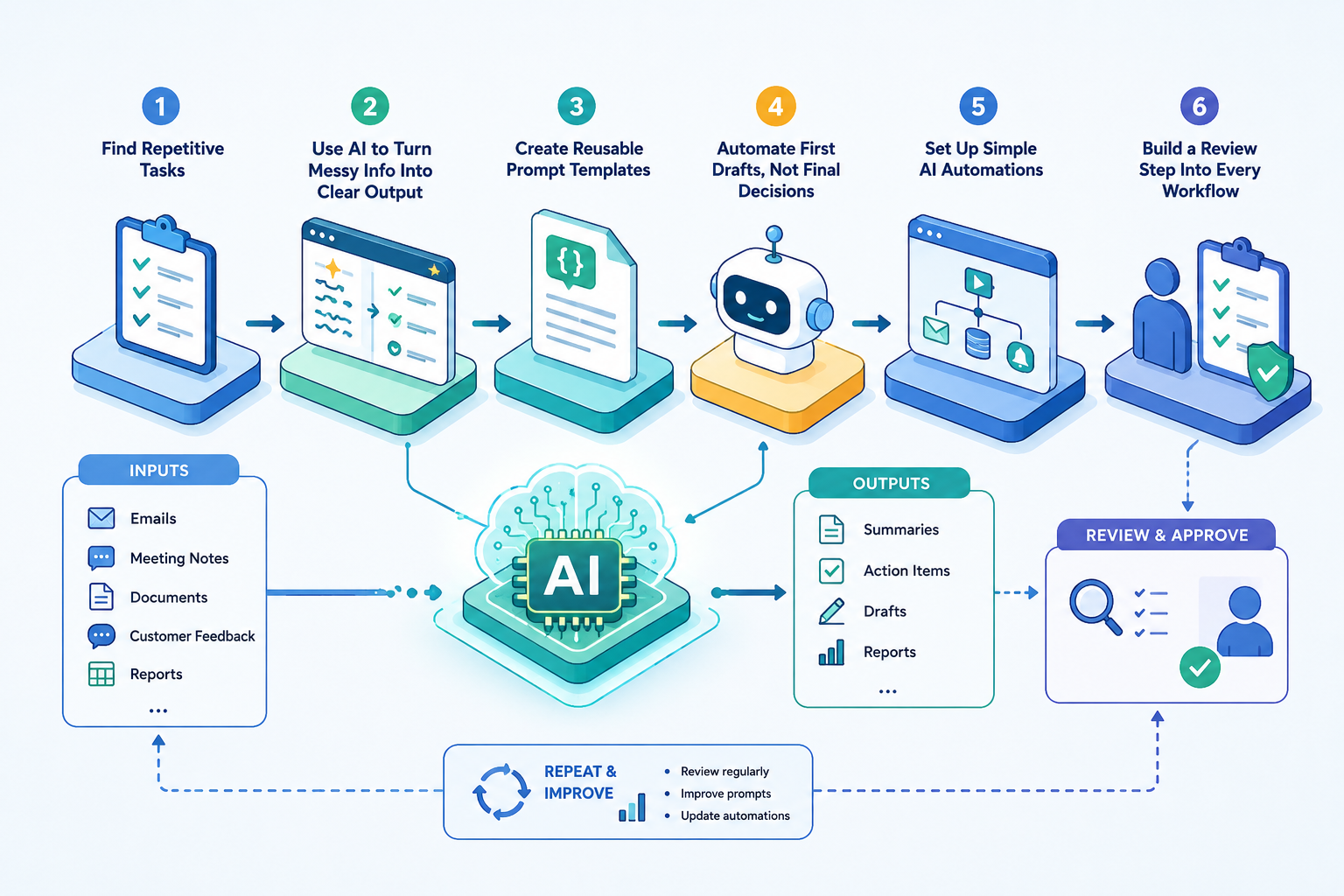
Set Up Simple AI Automations
AI automation does not need to be complicated. Many useful workflows can be simple.
For example, you can set up a process where new customer feedback is collected, AI summarizes the main points, and the summary is sent to the team every Friday. Another workflow could take meeting notes, extract action items, and create a task list. A third workflow could organize incoming requests by topic or urgency.
Simple AI automation ideas include:
Summarizing long emails into key points
Turning meeting transcripts into tasks
Creating weekly progress reports
Classifying customer feedback
Drafting standard replies
Generating blog outlines from topic ideas
Organizing research notes
Rewriting internal updates into a clearer format
The goal is not to automate everything. The goal is to remove small repeated steps that slow the team down.
Add a Review Step to Every AI Workflow
Every AI workflow should include a review step. This is especially important when the output affects customers, strategy, finance, legal topics, or public communication.
A good review step checks whether the information is accurate, the tone is appropriate, the output matches the company style, and nothing important is missing.
AI can speed up the process, but the team should still own the final result. This helps maintain quality while still saving time.
Keep Your AI Workflow Easy to Update
As your team changes, your AI workflow should change too. A prompt that worked well last month may need improvement if your process, audience, or goals change.
Review your workflows regularly. Look for outputs that need too much editing, prompts that are unclear, or automations that no longer save time. Small updates can make the system much more effective.
A useful habit is to keep a shared prompt library. When someone creates a prompt that works well, save it for the rest of the team. Over time, this becomes a practical AI playbook for your business.
Measure and Improve Your AI Workflow Over Time
To know whether your AI workflow is working, measure the result. You do not need complex tracking. Start with simple questions:
How long did this task take before?
How long does it take now?
How much editing is needed?
Is the output more consistent?
Does the team use the workflow regularly?
If the workflow saves time but creates quality problems, improve it before scaling. If it saves time and keeps quality stable, it is a strong candidate for wider use.
Final Thoughts
AI becomes more powerful when it is used as part of a repeatable workflow. Instead of only using AI for one-time tasks, teams can build simple systems that summarize information, create drafts, organize tasks, and prepare updates automatically.
The best AI workflow starts small. Choose one repetitive task, create a clear prompt, add a review step, and measure the result. Once the workflow works well, improve it and apply the same approach to other tasks.
With the right setup, AI can help teams spend less time on routine work and more time on decisions, creativity, and execution.
Contact Golden Sea Studios:
Website: goldenseastudios.com
Email: info@goldenseastudios.com
Social Media: @goldenseastudios (Twitter, Instagram, Facebook)
Telegram: @goldenseastudio
We are available online to assist you with any inquiries or collaborations. Reach out to us through these channels and let’s connect!
