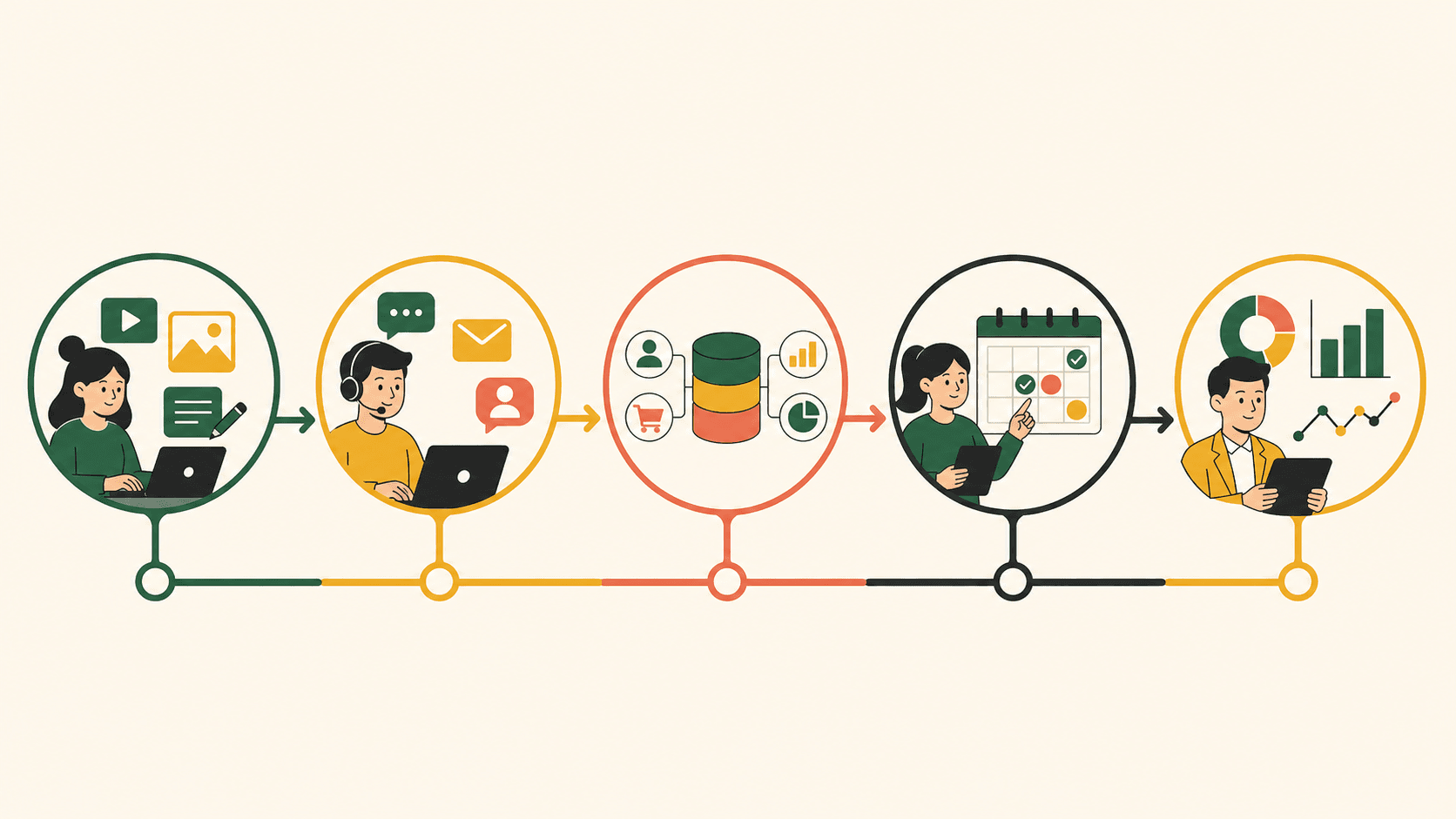

The five processes SMEs should automate first are content preparation, inbox triage, data synchronization, follow-up, and reporting. They occur frequently, involve many repetitive steps, and produce relatively well-defined outputs. More importantly, they can be rolled out piece by piece without replacing your entire system.
Good automation does not start with the most powerful technology. It starts with a task boring enough to be repetitive, important enough to be worth improving, and clear enough that you know when the system gets it wrong. The five workflows below meet all three conditions for most service businesses, retail, F&B, fitness studios, spas, and clinics.
How to prioritize workflows
Score each process from one to five on four factors: frequency, clarity of inputs and outputs, current cost, and risk if it fails. A good starting point scores high on frequency and cost, has fairly clear rules, but carries low failure consequences — or ones that can be caught by an approval step.
Don't pick the most frustrating process if it changes constantly and nobody can describe it. Standardize it first. Automating a chaotic process only makes errors appear faster and more consistently.
1. From brief to content draft
The workflow starts with a brief containing the topic, audience, goal, channel, and supporting evidence. AI researches within an approved source list, proposes an outline, produces a draft, and runs a checklist. The content lead reviews the arguments, facts, and brand voice before anything gets published.
Minimum inputs
- Product context and customer segments.
- Brand voice, including words to use and words to avoid.
- Goals and formats for each channel.
- Approved information sources.
- Pass/fail criteria before review.
Metrics worth tracking include time to first draft, outline approval rate, revision rounds, factual errors, and cost per approved piece. Don't use the number of articles produced as the only KPI; it incentivizes producing a lot of content that isn't useful.
2. Inbox triage and routing to the right person
AI reads new messages, identifies intent such as pricing inquiries, bookings, complaints, or consultation requests, then collects any missing information. Recurring questions can be answered from the knowledge base. Sensitive cases get routed to a staff member along with a summary.
The first wins don't necessarily come from fully automated replies. Triaging, prioritizing, and preparing context alone significantly reduce manual work. Staff open a conversation already knowing what the customer needs instead of re-reading the whole thread.
Guardrails you need
- Never promise prices or policies outside the official source.
- Never handle serious complaints alone.
- Clearly disclose when customers are interacting with AI, where appropriate.
- Log the sources used to answer.
- Allow staff to take over instantly.
3. Customer data synchronization
Customer information is usually scattered across fan pages, Zalo, forms, spreadsheets, and personal notes. A sync workflow pulls data from where it originates, standardizes field names, finds duplicate records, and updates the primary system. Incomplete or conflicting records go into a review queue.
This is a foundational workflow because Agents only make good decisions when the data is trustworthy enough. If two systems hold two different phone numbers, or customer statuses aren't kept up to date, automated follow-up will message the wrong person or at the wrong time.
Measure the rate of complete records, the number of duplicates, the time from data creation to update, and the number of errors requiring correction. Also assign a data owner; software cannot replace this accountability.
4. Following up with leads and past customers
The workflow tracks statuses and creates conditional reminders: a customer received a quote but hasn't responded, a booking needs confirmation, a completed service is due for a re-engagement touchpoint. AI can draft messages based on context; rules determine who gets messaged, when, and through which channel.
Don't turn follow-up into automated spam. Frequency, time windows, opt-out rights, and content must all be managed. For messages affecting policy or pricing, require approval. The goal is to never forget a qualified customer — not to send the most messages.
Metrics to track
- Share of leads followed up within SLA.
- Response rate after each reminder.
- Opt-out or negative response rate.
- Number of leads that slipped through.
- Revenue or bookings attributable to the workflow.
5. Operational reporting and alerts
Instead of copying numbers from multiple places at the end of the week, the workflow pulls data on a schedule, checks for gaps, computes metrics, and generates a summary. AI explains fluctuations in readable language but must link back to the underlying figures.
A useful report answers three questions: what happened, why it matters, and who needs to do what next. For example, "inbox volume up 30%" isn't enough. The system should point out that response times exceeded SLA during the evening shift and suggest reviewing staffing capacity.
Don't automate a dashboard of dozens of numbers nobody uses. Start with five to seven metrics tied to real decisions: response speed, new leads, follow-up rate, content output, data errors, and operating costs.
Recommended rollout order
- Data synchronization: build a trustworthy foundation.
- Reporting: establish a baseline and observability.
- Content drafting: generate quick wins while keeping the review step.
- Inbox triage: reduce the load before auto-replying.
- Follow-up: deploy once customer statuses are clean.
The order can shift depending on your pain points. A business handling hundreds of inbox messages a day might prioritize triage first. But if your customer data is extremely fragmented, fix the foundation before automatically sending any message.
A template for describing a workflow
- Trigger: what kicks off the process?
- Input: which data is required?
- Steps: what are the steps and which tools are involved?
- Decision: what is the Agent allowed to choose?
- Approval: where is a human required?
- Fallback: where does it route if something fails?
- Metric: how do you measure quality and impact?
Write these seven lines before watching any tool demo. If the team can't agree on them, the problem right now is operational design, not a lack of AI.
Mistakes that sink pilots
Common mistakes include picking a scope that's too big, having no baseline, using unmanaged data, ignoring exceptions, and failing to assign an owner. Another error is measuring only time saved while ignoring the time spent fixing errors and supervising.
A pilot should have a deadline, a test dataset, stop criteria, and a post-pilot decision. If quality falls short, the team needs to know whether they will fix the prompt, fix the data, change the workflow, or drop the use case.
Conclusion
The five workflows above map exactly to the five modules of an AI Operations layer: content, responses, data, follow-up, and reporting. They are close enough to daily operations to create impact, yet can be broken into pieces to control risk.
The next step is not to deploy all five at once. Pick one, describe it using the seven-part template, and run a pilot. Then use the 90-day AI Automation roadmap to scale with discipline.
Read next: Do Not Automate a Process That Is Already Chaotic · Measuring AI Automation ROI: 12 Metrics Beyond Hours Saved