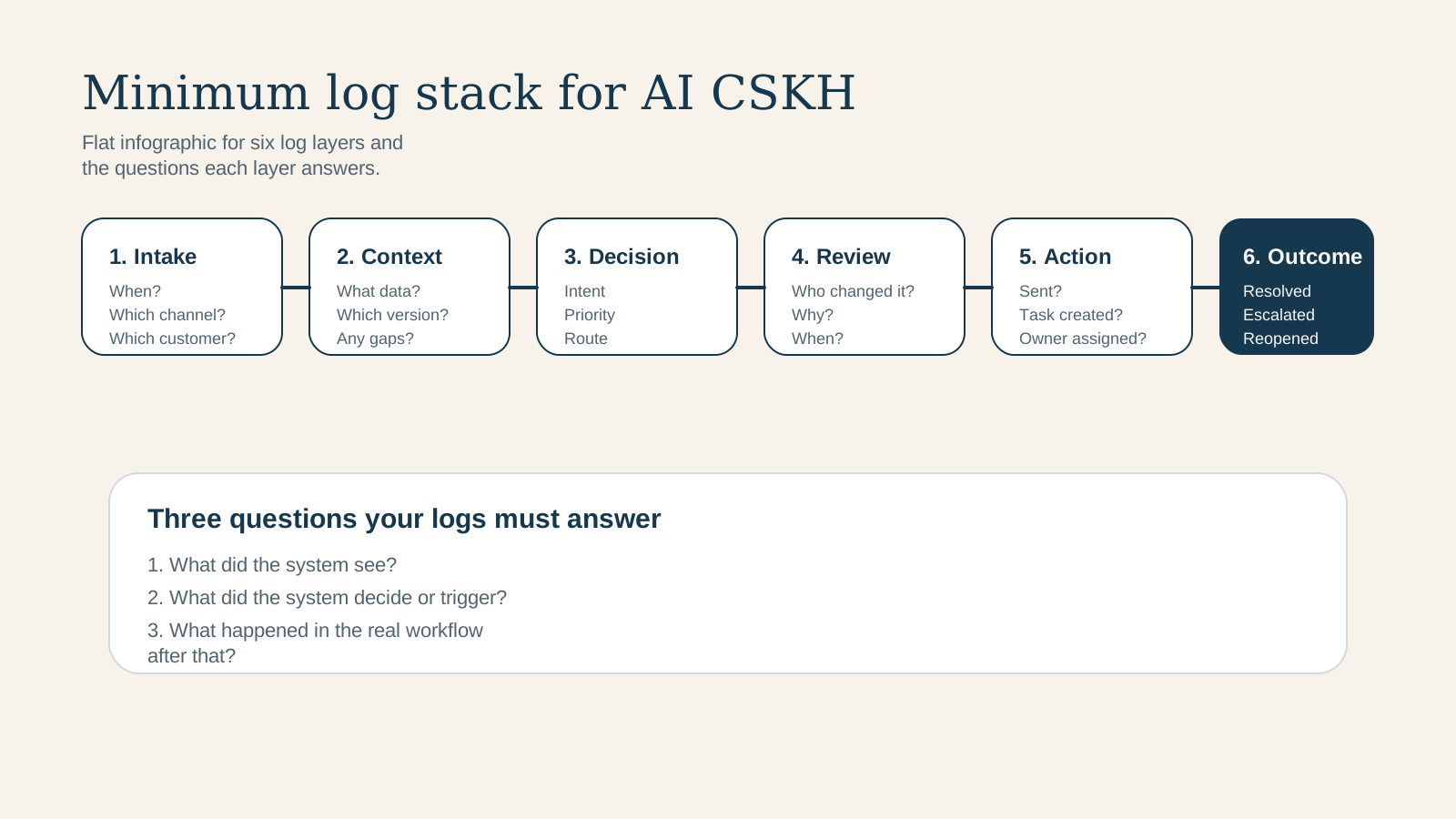

Short answer: If a business already lets AI touch inbox, chat, or customer-service email but still does not log each decision step, it has almost no reliable way to audit an incident. Minimum logging is not there to make dashboards look impressive. It is the evidence layer that tells the team what the AI read, which rule it used, who approved what, and why a case was routed correctly or incorrectly.
Golden Sea's view: in AI customer service, a polished answer that cannot be traced is often more dangerous than a clumsy answer the team knows how to fix.
Why should log design move up the priority list now?
Fresh July 2026 signals are converging on the same pattern: the market is no longer asking only whether AI responds quickly or naturally. It is asking who can prove what the system relied on when something goes wrong. Salesforce's article on AI agent answer accuracy, published on July 26, 2026, highlights a practical requirement: AI-generated metrics should trace back to certified datasets, business logic, and metadata so they create an automatic audit trail. Salesforce's AI guardrails article from July 10, 2026 frames audit trails as part of the governance layer itself, not a nice-to-have for large enterprises.
Zendesk adds an operational signal. In its March 2026 release notes, it introduced more granular permissions for viewing audit and access logs. That sounds small, but it maps directly to an SME pain point: not everyone on the team should see everything, yet if nobody can inspect the logs, the business falls back to guesswork when a failure happens.
OpenAI's sandbox-agent guidance and its Admin/Audit Log API changelog both reinforce the same architecture principle: execution should stay separate from audit, human review, and recovery state. That matters for Golden Sea because it supports a broader point: AI customer service should not be treated like a talking widget. It should be treated like a workflow with a control plane, evidence, and recovery paths.
Qualitative Indie Hackers signal also fits. A recent post about AI agents failing silently describes exactly the risk many SMEs face: the agent does not crash loudly the way traditional software does. It still appears useful while taking the wrong path or using the wrong context. Another discussion about automation stacks for digital-product businesses repeats a familiar pain: webhook failures, duplicate records, dropped notifications, and an operator who ends up manually checking every connection. These are qualitative observations, not quantitative benchmarks, but they fit perfectly with the need for observability in AI customer service.
What exactly counts as a “minimum log set”?
Golden Sea does not recommend recording every possible signal from day one. Too much logging without a purpose simply overwhelms the team. What matters is a small enough log set to use weekly, but deep enough to reconstruct a real failure.
| Log group | What to store | What breaks if missing |
|---|---|---|
| 1. Event intake | Timestamp, channel, customer identifier, raw message or event type, source campaign or queue. | The team cannot tell where the case started, when it started, or which lead it belongs to. |
| 2. Context retrieval | Knowledge source, policy version, CRM record, fields pulled into context, confidence or missing-data flags. | No one can prove whether the AI used the right data or relied on stale context. |
| 3. Decision log | Assigned intent, priority, route, SLA tier, escalation trigger, blocked-topic trigger. | The team sees only the final output without knowing why the system chose that path. |
| 4. Human review log | Reviewer, edits made, approved or rejected status, rejection reason, review timestamp. | The team cannot tell whether the failure sits in the model, the knowledge layer, or the review layer. |
| 5. Action log | Message sent, task created, owner assigned, callback scheduled, fallback queue used. | The case disappears between AI suggestion and real-world action. |
| 6. Outcome log | Resolved, escalated, reopened, customer complaint, SLA breach, booked next step. | The business cannot measure whether AI is creating value or simply shifting work elsewhere. |
These six layers are enough to answer the three questions that matter most after an incident: what the system saw, what the system or rule decided, and what actually happened in the real workflow.
Why is AI customer-service logging different from ordinary software logging?
Traditional software often fails in a more obvious way: timeout, exception, malformed request, parsing error. AI customer service can fail while everything still looks technically successful. The message gets sent. The customer receives a response. But the intent was classified incorrectly, the source policy was outdated, or a case that needed human takeover stayed inside the auto-flow.
That is why AI customer-service logs need three additional layers teams often forget:
- Source-of-truth version: which FAQ, pricing, policy, or knowledge article version the system used at that moment.
- Minimum decision rationale: which intent, priority, or trigger caused the route.
- Human-override visibility: what a reviewer changed and why.
Without those layers, a team may have a clean transcript but no forensic trail. When a customer complains, people start arguing from memory instead of evidence.
What should be logged by case type?
| Case type | Extra log fields | Why it matters |
|---|---|---|
| Low-risk repetitive FAQ | Knowledge source ID, answer template, send status. | Shows whether self-service is stable and how often it resolves automatically. |
| Inquiry needing sales follow-up | Lead score, owner assignment, next-step due time, contact outcome. | Shows whether failure happened at intake, routing, or follow-up. |
| Complaint or refund | Escalation trigger, reviewer, policy reference, sentiment flag. | Supports sensitive-case review and proves why the case skipped auto-send. |
| AI-drafted email | Draft version, reviewer edits, final send approval, restricted-topic flag. | Separates model failure from reviewer or policy failure. |
| Voice or missed-call recovery | Transcript reference, callback owner, booked outcome, fallback queue. | Shows whether routing and callback logic actually recovered the opportunity. |
The point is not to force identical logs across every queue. The point is to make each queue explainable enough for the decisions that matter there.
What should a minimum logging design look like for an SME?
For most SMEs, Golden Sea recommends starting with a compact operating model:
- Inbound event table: where the case came from, when it entered, which customer it belongs to, and which campaign or queue triggered it.
- Context snapshot: the knowledge sources or CRM records the system pulled in.
- Routing record: intent, urgency, owner, SLA tier, and triggering rule.
- Review record: created only if the case crosses a human gate.
- Outcome record: closed with a real-world result such as resolved, escalated, booked, complaint, or reopened.
The principle matters more than the table names: do not blindly overwrite state. If the owner or SLA changes mid-case, create a new event instead of hiding the earlier decision. Good logs show the decision path, not only the last visible state.
Which observability KPIs should a team review weekly?
- Missing-context rate: how often AI acted while knowledge or CRM context was incomplete.
- Human-override rate: how often drafts or routes had to be manually corrected.
- Wrong-escalation rate: how often cases were escalated incorrectly or not escalated when they should have been.
- SLA breach by route: which queues are causing the most delay after routing.
- Reopen or complaint rate: which “resolved” cases come back as complaints or reopen later.
Those five indicators are far more useful than a pretty dashboard showing total messages sent. The goal is not volume. The goal is decision quality and system repairability.
Five logging mistakes that create the illusion of observability
- Storing only the final transcript. The answer is visible, but there is no context, route, reviewer, or policy version behind it.
- Storing too much without one shared case ID. Each tool has logs, but no one can reconstruct one customer journey end to end.
- Not logging manual overrides. AI gets corrected, yet the team learns nothing about what repeatedly goes wrong.
- Not storing source versions. Policies change, but the business cannot prove which version informed the reply.
- Not logging fallback queues. The case exits the AI flow but disappears before a real person actually handles it.
When should an SME keep the system in NEEDS_WORK instead of scaling?
If the team still lacks one shared case ID across channels, override logging, or knowledge-source IDs per response, it should not scale AI customer-service volume yet. At that point every later failure becomes hard to debug, and the team may incorrectly conclude that “AI is not trustworthy” when the real issue is that the observability layer is too thin.
Conclusion
A minimum log set for AI customer service does not need to be an oversized enterprise program. For SMEs, it only needs to answer three questions reliably: how the case started, what the system decided, and what the final outcome was. Once those three are visible, the business can improve workflow, tighten guardrails, and prove accountability when AI touches frontline communication. Without that, every failure leaves behind only a vague feeling that “the bot probably answered wrong.”
Read next: AI customer service QA checklist · Which data must be clean before AI drafts support email? · Inbox SLA for AI customer service · Which chatbot knowledge-base documents should you clean first? · Minimum architecture for automated lead classification