
Short answer: For SMEs using AI to support customer service, SLA should not be a single number like 'reply within five minutes.' You need at least three layers: first-response time, owner assignment or human handoff time, and the deadline for the next concrete step. If you only measure speed without handoff thresholds and priority rules, the inbox may look faster while still leaking customers.
Golden Sea's operating view: AI makes the inbox faster. SLA makes that speed trustworthy. Without SLA, speed is only surface-level activity.
Why should this topic move up the queue?
Many businesses misunderstand the AI customer-service problem. They buy a chatbot or agent expecting '24/7 response' and assume the operating model is solved. But Zendesk documents SLA as multiple metrics, including First Reply Time, Next Reply Time, Requester Wait Time, and Agent Work Time. That means a healthy inbox is not judged only by the first reply. It also depends on how long the customer waits between touches, how much real human time is spent resolving the issue, and whether the team keeps momentum through the entire ticket lifecycle.
Microsoft Dynamics 365 follows the same logic by allowing teams to define work hours and pause or resume SLAs by KPI and by condition. For SMEs, this is not just an enterprise feature. It is an operating principle: a customer asking for opening hours, a customer escalating a complaint, and a prospect waiting for a quote should not live under the same SLA threshold.
Salesforce describes omnichannel routing as a way to make SLAs easier to hit by prioritizing work based on urgency and business rules. In other words, when queue design and routing are wrong, teams often blame AI or staff performance even though the real failure sits in the operating design.
In Vietnam, especially for service-led SMEs, the issue is more sensitive because the inbox often serves several jobs at once. It captures new leads, handles after-sales support, and absorbs complaints. Zalo OA, Facebook, web chat, and follow-up forms can all land in the hands of a very small team. Without lanes and SLA rules from the start, the business applies the same response speed to every situation and almost inevitably prioritizes the wrong work.
What should an inbox SLA for AI customer service include?
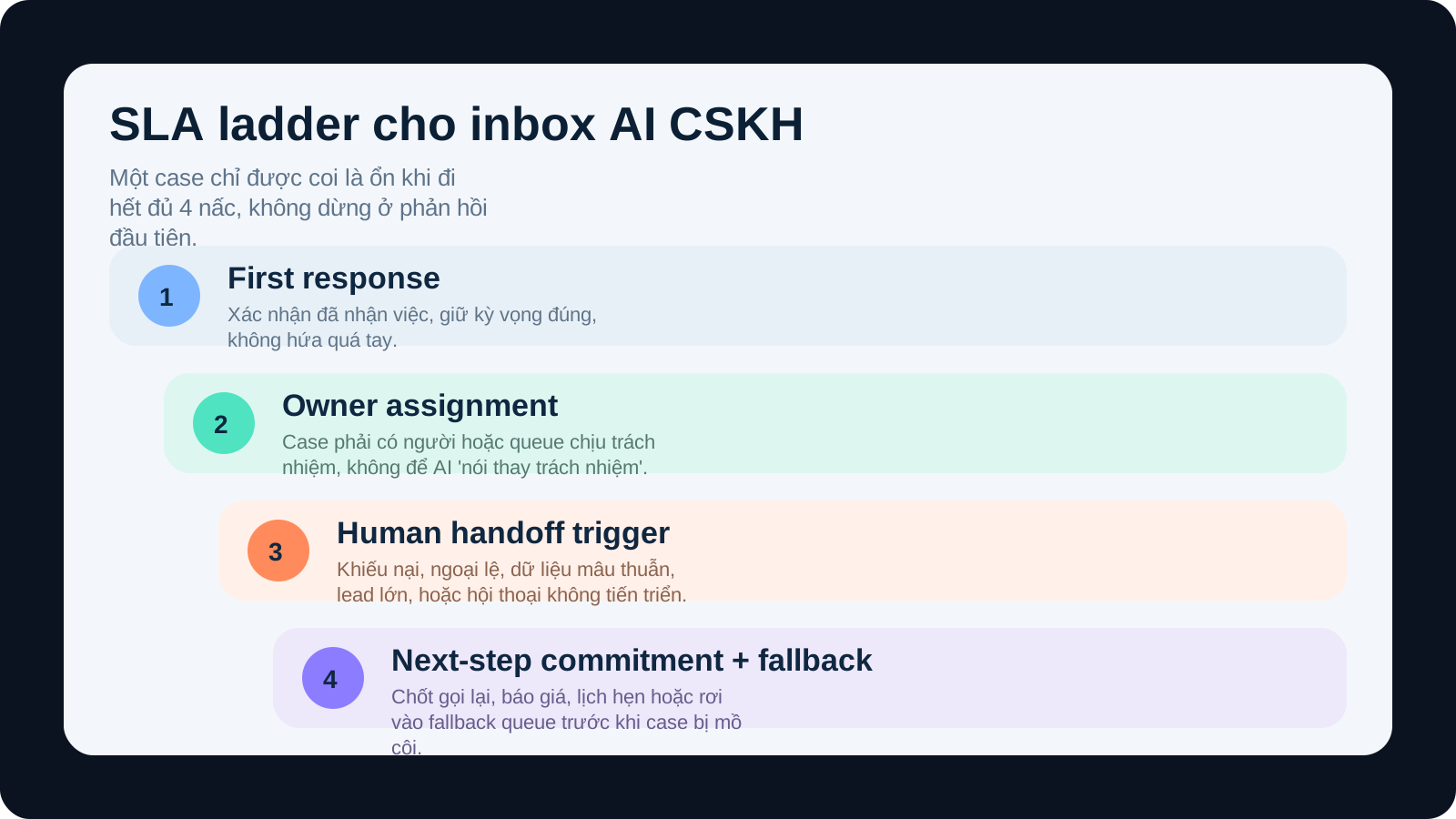
The simplest model is to treat inbox SLA as three connected layers rather than one target.
| SLA layer | The question it answers | Why it matters operationally |
|---|---|---|
| 1. First response | How quickly does the customer receive a clear first response? | Reduces initial frustration and prevents early lead loss. |
| 2. Ownership / handoff | When does a real person take responsibility, or when is the case escalated? | Prevents situations where AI replies but nobody actually owns the problem. |
| 3. Next-step commitment | How soon must the next concrete action be defined: callback, quote, appointment, or escalation? | Turns conversation into action instead of leaving promises inside chat history. |
Zendesk notes that reply-time metrics and resolution-oriented metrics are not the same thing. That matches Golden Sea's field view: some cases only need a fast acknowledgment, while other cases need a clearly committed next step or the inbox still fails.
Do not start with one number for the whole inbox
The most common mistake is setting one blanket target such as 'all messages must be answered within five minutes.' It sounds decisive, but in practice it usually breaks three things.
- It rewards quick filler responses instead of useful progress. Teams reply fast to hit the clock, then let the case stall.
- It pushes AI into the wrong role. Businesses keep sensitive conversations in automation just to preserve dashboard appearance.
- It hides the real bottlenecks. First response may look strong while handoff, escalation, or follow-up silently fails.
This is why Microsoft lets teams configure work hours and pause or resume behavior. A case that is waiting for customer documents should not be counted in the same way as a case the team has simply neglected.
A minimum SLA model for service SMEs
If you need a practical baseline for the first 30 days, Golden Sea usually recommends four inbox lanes:
| Lane | Example | First response | Owner / handoff | Next step |
|---|---|---|---|---|
| Hot lead | Wants to book, needs a quote quickly, requests a callback today | 5-10 minutes during business hours | Named owner or advisor within 15 minutes | Call, proposal, or booked appointment on the same day |
| Warm lead / qualification | Early-stage inquiry, missing data, broad exploration | 10-20 minutes | Qualification queue within 30 minutes | Request missing information or send contextual material within the day |
| Standard support | Status update, policy question, simple request | 15-30 minutes | Human handoff if unresolved after one or two turns | Clear resolution path or next reply window before shift end |
| Sensitive / complaint | Refund, service failure, brand-risk issue, personal-data concern | 5-15 minutes acknowledgment | Human-only immediately or after very short triage | Escalation with named owner and next update within one hour |
The key point is not that these exact numbers fit every company. The key point is that each lane needs different logic. Zalo or Facebook are only input channels. SLA should follow urgency, risk, and commercial value.
When must AI hand the case to a human?
This is the part many teams skip. They treat handoff as something that happens only when the system gets stuck. In practice, handoff should be a predefined rule. Otherwise, the better AI sounds, the more dangerous overconfidence becomes.
Golden Sea usually applies six immediate handoff triggers:
- The customer shows frustration or loss of trust.
- The request touches policy, money, refunds, or legal commitments.
- The customer asks for an exception.
- The data is contradictory.
- The case is commercially high-value.
- The AI has taken one or two turns without real progress.
This matches Salesforce's emphasis on urgency-based routing and business rules. AI should help with triage, information capture, and rhythm. Final judgment for sensitive cases should remain human.
SLA must sit together with queues and fallback design
Microsoft recommends advanced queues and a fallback queue as a safety net. That detail matters for SMEs. A fallback queue can be simple, such as a supervisor lane or a final review queue at the end of a shift. Without it, SLA fails precisely where the original rule model stops being clear.
A common example is after-hours inbox traffic. If a lead arrives at 10 p.m., what SLA is actually running? Are you counting calendar hours or business hours? Does the system send a confirmation message and commit to a next-morning follow-up? Does the case land in a fallback queue so the morning team sees it first? If none of that is defined, the team will debate the rules only after the customer is already disappointed.
That is why a useful policy usually needs three meta settings: business hours, pause conditions, and a fallback queue.
What should a minimum SLA dashboard include?
If the dashboard only shows average response time, you cannot tell whether the team is actually improving or merely masking failures. A minimum dashboard should include:
- On-time first-response rate by lane.
- Time from first response to owner assignment.
- Rate of cases that required handoff but were handed off late.
- Volume of cases landing in the fallback queue.
- Breach rate by channel: Zalo, Facebook, web chat, and email.
- Top breach causes: missing owner, weak rules, after-hours arrival, customer delay, or backlog.
Zendesk stresses that SLA is only one piece of the wider workflow. The dashboard should therefore reveal where the workflow breaks, not only whether a deadline was missed.
A 30-day playbook to bring order to the inbox
| Week | What to do | Output |
|---|---|---|
| Week 1 | Map every conversation type and every channel entering the inbox. | A lane map, risk levels, case types, and expected owners. |
| Week 2 | Set first-response, handoff, and next-step thresholds for each lane. | SLA v1 plus human-handoff triggers. |
| Week 3 | Configure queues, fallback, business hours, pause conditions, and a basic dashboard. | Shadow-mode workflow with breach logging. |
| Week 4 | Turn the SLA on for one or two priority lanes first. | A report showing on-time SLA, escalations, and weak rules. |
Do not roll the full policy across every channel on day one. Start with hot leads and standard support. When those lanes behave consistently, expand into complaints and more complex after-hours journeys.
Five mistakes that make the inbox faster but worse
- Measuring first response without owner assignment.
- Leaving handoff triggers undefined.
- Using one SLA for every channel and every urgency level.
- Running without a fallback queue.
- Failing to audit breaches by cause.
Conclusion
Inbox SLA for AI customer service is not a search for one attractive number. It is the operating work of dividing the inbox into the right lanes, setting the right response thresholds, deciding exactly when humans must step in, and building a safe fallback so edge cases do not disappear into blind spots. For most SMEs, that maturity step matters far more than making the bot sound slightly more impressive.
Read next: Should SMEs start with calls or inbox? · A 15-minute missed-call follow-up playbook · AI customer service QA checklist · What data must be clean before handing customer email to AI? · Minimum architecture for automated lead classification